
How to Get Your Music on Apple Music
It's so easy to upload music to Apple Music with Ditto. Get started right now and make your music available to fans across the world Apple's global streaming service. Plus you'll keep all of the royalties you earn.
How to Upload Music to Apple Music
Getting your music on Apple Music starts with choosing a distributor like Ditto Music. Upload your audio, cover artwork, and release details, and once approved, your music will be delivered straight to Apple Music for listeners around the world to discover.
Here’s a simple step-by-step guide to get you started.
1. Sign up for a Ditto Music account.
2. Upload your music to Apple Music along with your artwork, lyrics and drop date.
3. Submit credits and any collaborators to split royalties from Apple.
4. Get your Pre-Add link and promote it to your fans.
5. Receive in-depth streaming reports and keep all the royalties you earn.
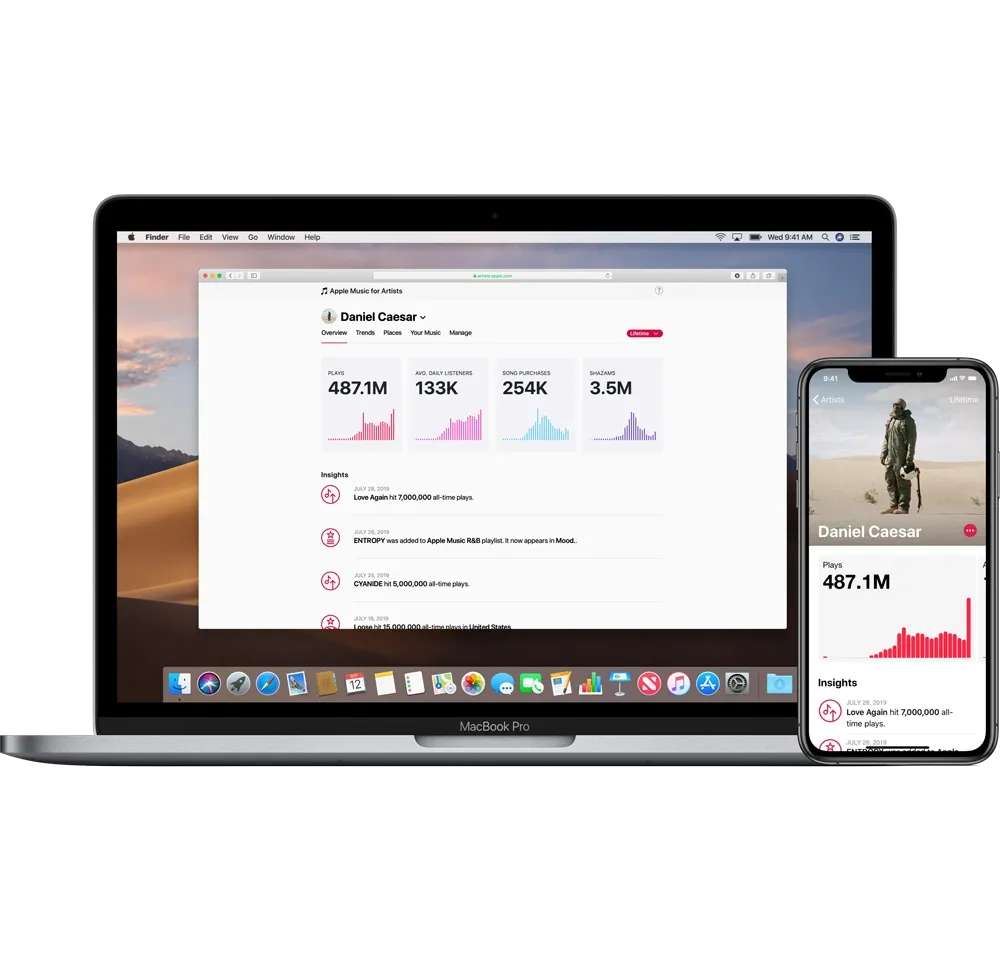
Why Put Your Songs on Apple Music
Over 70 million music fans across the globe use Apple Music to discover, stream and download new music every single day.
Uploading your music to Apple Music with Ditto means you'll also get a free Apple Music Pre-Add SmartLink to share with fans in time for your next release.
From there, you can tap into Apple Music’s built-in tools and features to promote your release, build momentum, and reach new fans.
You’ll also be able to access streaming data and insights about both your music and your audience on your personal Ditto dashboard.
Why use Ditto Music.

Unlimited Releases
Release as much music as you like to every major music platform worldwide.

Free Pre-Save SmartLinks
Let fans pre-save your music before it drops and share your release everywhere with just one link.

Keep 100% Royalties
Keep 100% of the royalties you earn and all of the rights to your music.

Publishing, Sync & More
Access tools and services to boost your profile and earnings, including publishing, sync pitching, chart registration and more.

Advanced Analytics
Explore streaming insights, download numbers and listener demographic data. Get the Ditto app to track stats from your phone.

Fast Payouts
Get paid royalties directly into your account and withdraw your earnings with a couple of clicks.

Split Payments
Automatically split royalties with your collaborators, producers, features, songwriters or anyone else who's earned a cut.

Get Signed
We scout talent from our distribution services and sign them to label services deals where we can offer more marketing support.

More Stores
Distribute to 150+ stores in a single upload. Land on every platform that pays.
From bedroom uploads to Grammy stages.












Apple Music Distribution FAQ
Can I upload music to Apple Music?
Yes! As long as the quality of your audio and artwork meets the platform’s specific guidelines, you can upload your music to Apple Music with zero fuss! Take a look at our rules & guidelines for audio and artwork before submitting your release to us to make sure it gets approved the first time round.
How long will it take to upload music on Apple Music?
If you want to get your music on Apple Music within 72 hours, you can do so through our Priority Distro service. Otherwise, you can expect it to around 10 days to get your release processed by our team and approved by Apple Music.
Can I pick a specific release date on Apple Music?
Yes! As part of your subscription when you sign up with Ditto, you can select an exact release date for your track. Other distributors (like Distrokid) don't provide this option with extra costs. Just make sure the release date you’re submitting is at least 2 weeks from the day you upload it to our platform.
How much will I earn from Apple Music royalties?
It’s hard to predict how much you could generate from getting your music streamed on Apple Music. Apple Music’s pay-per-stream rate is influenced by a number of different factors, such as the location of your listener and whether or not they’re streaming your track from a paid or free subscription. Learn more about how much you can earn from Apple Music with our Streaming Royalties Calculator.
When can I expect to get paid by Apple Music?
You’ll be always get 100% of your Apple Music royalties directly into your Ditto account as soon as we receive them. You should expect a delay of usually around two months for royalties to arrive in your account after a track has been uploaded to the platform.
How do I sign up for Apple Music for Artists?
After your first release is live on Apple Music, you can then sign up for Apple Music for Artists, where you can edit, update and verify your Apple artist profile. You'll just need to enter a few basic questions to confirm who you are.
After you've done that, you'll be able to view your listener analytics and access new ways to promote your tracks on Apple Music.
How can I get more streams from Apple Music?
Once you are signed up to Apple Music for Artists you can and access the platform’s in-app marketing tools and features. Keep an eye on our Unsigned Advice blog and subscribe to our mailing list so you don’t miss out on all the latest music industry advice and tips on promoting your music on Apple Music.
How do I start putting songs on Apple Music?
Just sign up for a Ditto Music account. Once you’re signed up, you can start uploading your music to Apple Music instantly. It’s really that easy. Not to mention you’ll keep 100% of the royalties you make.