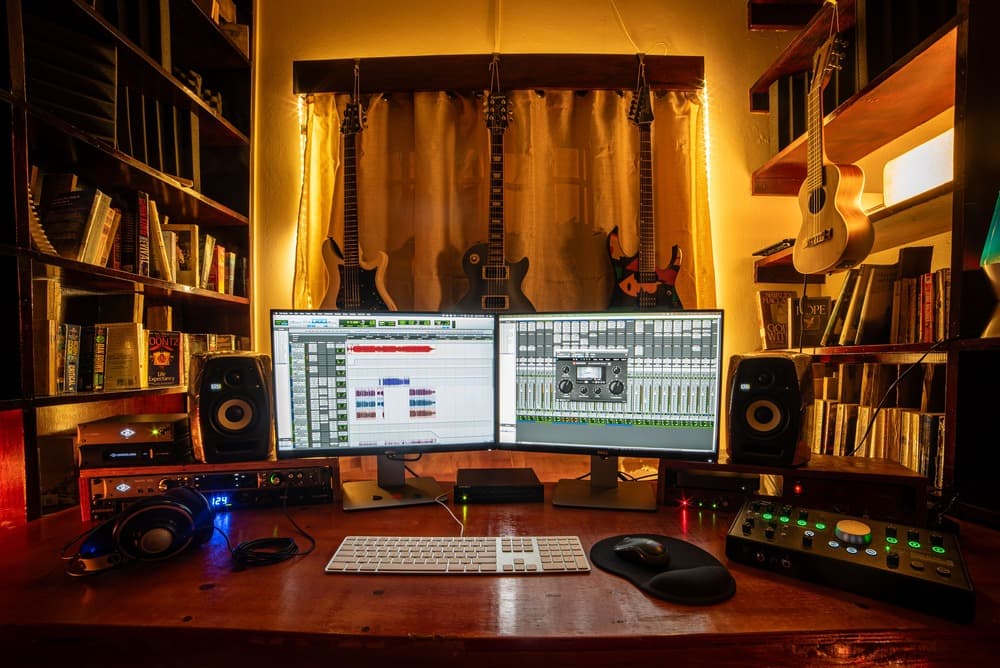
Durante anos, o som profissional tinha um preço que a maioria dos artistas independentes não conseguia arcar. Isso está chegando ao fim. Veja a seguir o que mudou, como é, na verdade, uma cadeia vocal profissional completa hoje em dia e como montar uma por uma fração do custo anterior.
A gravação caseira sempre representou um custo oculto para os artistas independentes. Não é o tempo de estúdio. Não é a interface nem o microfone. São os plug-ins. O software que transforma uma gravação vocal bruta em uma faixa finalizada foi desenvolvido para estúdios comerciais, e uma cadeia de produção profissional completa poderia custar milhares antes mesmo de você lançar uma única música.
Em 2026, esse imposto entrará em colapso. Os plugins caros não estão desaparecendo porque ficaram piores. Estão desaparecendo porque as alternativas mais baratas ficaram tão boas quanto eles. Para um artista independente, isso muda discretamente o que será possível no seu próximo lançamento.
Principais conclusões
- Uma cadeia vocal profissional completa costumava custar milhares. Hoje, é possível montar uma igual por uma pequena fração desse valor.
- Essa mudança decorre de três fatores: maior acessibilidade do poder de processamento, desenvolvimento moderno mais ágil e ferramentas que chegam diretamente aos artistas.
- Você só precisa de seis ferramentas para mixar uma faixa vocal: afinação, equalização, compressão, redução de sibilância, saturação e reverberação. Este guia aborda as três principais.
- Invista o que economizar onde realmente importa: na produção e no lançamento de mais músicas.
Por que os plugins sempre custaram tanto?
Os plug-ins caros cobravam esses valores por um motivo. Uma cadeia de processamento vocal não é uma única ferramenta, é um conjunto, e cada componente molda o som um pouco mais. Durante anos, a versão padrão do setor de cada componente custava entre US$ 100 e US$ 500, ou até mais.
Esse preço fazia sentido para quem estava comprando. Os estúdios comerciais podiam contabilizar o software como custo operacional e repassar esse valor nas tarifas por hora. As empresas que fabricavam as ferramentas vendiam para profissionais, com preços voltados para profissionais, e faziam atualizações de acordo com os ciclos profissionais, que eram mais lentos. Ninguém estava desenvolvendo produtos para o artista que gravava no quarto depois do trabalho.
Então, se esse era o seu caso, as opções eram ruins: reservar um estúdio que você não tinha condições de pagar, usar ferramentas de forma ilegal e torcer para dar certo, ou lançar músicas que não conseguiam competir de verdade nas plataformas de streaming. Milhões de artistas tiveram que escolher entre essas três opções ao longo de duas décadas.
O que realmente mudou?
Três coisas aconteceram ao mesmo tempo e, juntas, acabaram com a credibilidade daquele plugin caro.
- A tecnologia se tornou acessível. O processamento que antes exigia hardware proprietário e um orçamento de pesquisa enorme agora funciona perfeitamente em qualquer laptop. A barreira técnica que justificava o preço praticamente desapareceu.
- O desenvolvimento moderno ficou mais rápido. Uma nova geração de desenvolvedores consegue lançar um plugin poderoso rapidamente, integrá-lo a uma interface visual elegante e atualizá-lo constantemente, em vez de apenas uma vez a cada poucos anos. As ferramentas agora melhoram mensalmente, e não a cada década.
- As ferramentas chegam diretamente aos artistas. Sem margem de lucro do distribuidor, sem intermediários. É assim que um plugin moderno consegue atingir o padrão do setor, com um desempenho superior, e ainda assim custar uma fração do preço.
Essa é a mudança na qual se baseia uma nova geração de criadores, Rys Up Audio entre elas: reformular os clássicos para que sejam modernos, acessíveis e, de fato, ao alcance das pessoas que fazem música.
Como é uma cadeia vocal completa?
Eis a parte prática. Você não precisa da versão mais cara de cada ferramenta. Você precisa de versões bem projetadas de seis itens essenciais, mais ou menos nesta ordem:
- O ajuste de tom e afinação mantém a voz na afinação correta, desde um leve ajuste até o som totalmente afinado.
- O EQ abre espaço para que a voz fique nítida e não entre em conflito com a batida.
- A compressão equilibra os momentos mais altos e mais baixos, para que cada palavra seja bem ouvida.
- A redução de sibilância suaviza os sons agudos de “s” e “t”.
- A saturação confere calor, presença e personalidade.
- A reverberação e o delay situam a voz em um espaço e conferem profundidade a ela.
Aprenda o que cada um deles faz e você poderá transformar uma gravação bruta em um som pronto para lançamento, aqui mesmo em casa. Hoje em dia, é possível montar toda essa cadeia de processamento usando plug-ins modernos e acessíveis, por um preço inferior ao que um único plug-in padrão da indústria costumava custar. Vamos dar uma olhada nos três que fazem o trabalho mais pesado.
Compressão: a ferramenta que dá às vozes um som de alta qualidade
Se uma mixagem vocal soa “colada” e a sua não, a compressão geralmente é o que faz a diferença. Um compressor monitora o nível do seu vocal e abaixa automaticamente os momentos mais altos, centenas de vezes por minuto, de forma muito mais rápida e consistente do que ajustar um fader manualmente.

Observe como o medidor de redução de ganho reage à medida que o limiar diminui e, em seguida, como todo o caráter do modelo óptico se altera.
Dois controles são responsáveis pela maior parte do trabalho. O Threshold determina o nível de volume que a voz precisa atingir para que o compressor entre em ação. O Ratio determina a intensidade com que ele atua. Fique de olho no medidor de redução de ganho enquanto canta: se ele oscilar entre 3 e 6 dB nas frases mais altas, você está no ponto ideal para a maioria dos vocais modernos.
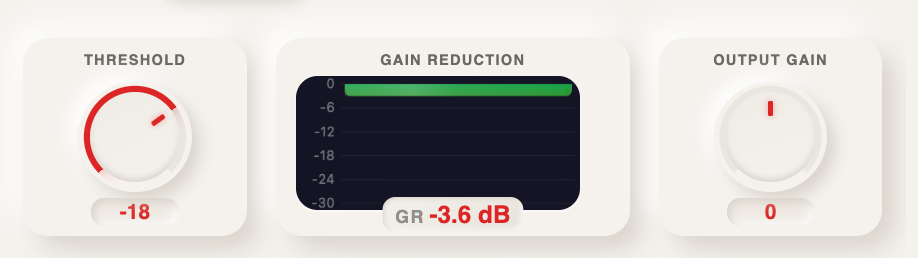
Em destaque: limiar, redução de ganho em tempo real e ganho de saída. Essa única linha representa 90% da compressão.
Os compressores clássicos de estúdio também apresentavam diferentes variantes, e cada uma delas tem um som próprio. Os circuitos ópticos são suaves e tolerantes com os vocais. Os modelos FET são rápidos e agressivos. Atualmente, os compressores modernos e acessíveis reproduzem várias dessas características em um único plug-in, o que antes exigia a compra de cada modelo separadamente.
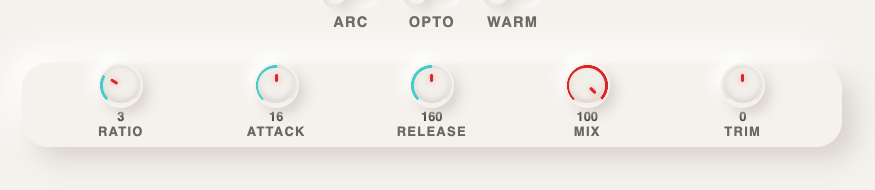
Os controles de ajuste fino: ratio, attack, release, mix e trim. Comece com os valores padrão e altere um por vez.
EQ: criando espaço para que cada palavra tenha impacto
Uma gravação vocal raramente soa mal por ser uma gravação ruim. Ela soa mal porque está competindo com os instrumentos pelas mesmas frequências. Os melhores plug-ins de equalizador Corrija isso diminuindo algumas frequências e aumentando outras, até que a voz tenha seu próprio espaço.

Clique na curva para criar uma banda, arraste para ajustá-la e deslize o cursor para identificar o problema. O equalizador moderno é assim tão direto.
Três passos são suficientes para cobrir a maior parte dos vocais:
- Elimine os graves mais profundos. Ateple tudo abaixo de cerca de 80 Hz. Não há nada de útil nessa faixa de frequência em uma voz, apenas distorção e ruído do microfone.
- Elimine o som encorpado. Realce uma faixa estreita, percorra-a lentamente entre 200 e 500 Hz até que a voz soe pior; então, corte nessa frequência. É esse som estridente que se esconde na maioria das gravações caseiras.
- Aumente os agudos. Um realce suave e amplo na faixa de 10 a 12 kHz confere aquele brilho arejado e sofisticado que você ouve em discos comerciais.
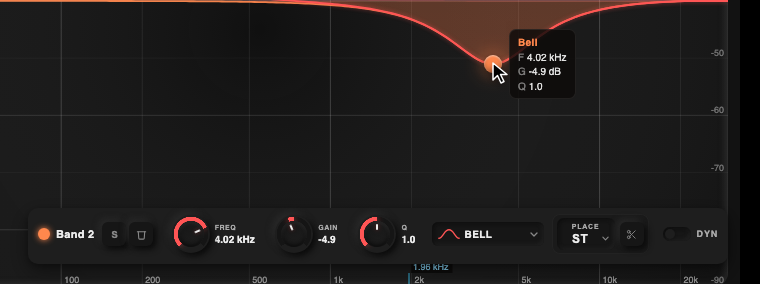
Detalhe: cada banda exibe sua frequência, ganho e largura exatos enquanto você arrasta. Sem suposições.
Os equalizadores profissionais mais antigos exigiam que você fizesse tudo isso por meio de fileiras de botões minúsculos. Os modernos permitem que você selecione a própria curva, observe o espectro da voz se movimentar em tempo real e ouça a mudança enquanto arrasta. É mais rápido de aprender e mais rápido de usar.
Correção de afinação: o som dos últimos vinte anos
Se havia um plugin que representava os caros softwares profissionais, esse plugin era o corretor de afinação. A afinação da voz — seja um leve ajuste ou aquele som totalmente afinado que caracteriza os refrões do rap, do pop e do R&B modernos — costumava depender do software mais caro disponível.

Escolha as notas nas quais a voz pode pousar e, em seguida, defina a velocidade com que ela se ajusta. Esse é todo o fluxo de trabalho.
O fluxo de trabalho é mais simples do que sua reputação sugere. Você informa ao plug-in em que tom está sua música ou digita as notas exatas que deseja em um teclado. Em seguida, um único botão determina a rapidez com que a voz se ajusta a essas notas. Configurações lentas soam naturais e imperceptíveis. Configurações rápidas proporcionam, propositalmente, aquele efeito robótico de afinação rígida.
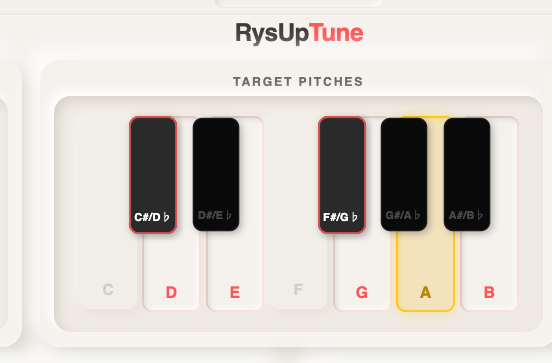
Em destaque: o teclado de notas-alvo. Toque nas notas que correspondem à sua música, e a voz só poderá cair nessas notas.
A segunda parte do som é a velocidade. Cerca de 40 ms soa natural na maioria dos vocais. Se você ajustar esse valor para perto de zero, obtém aquele estalo instantâneo que soa como um efeito deliberado.
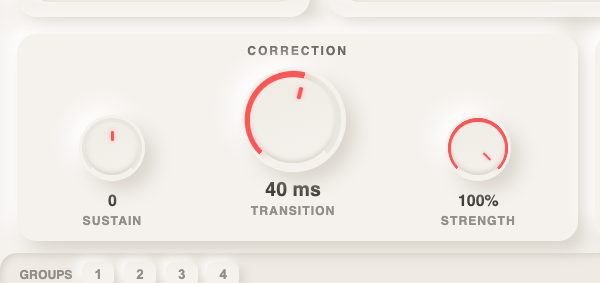
Em destaque: a velocidade de transição é o botão que determina se o som será natural ou bem definido. Um controle, dois mundos.
Um plugin como o RysUpTune oferece toda essa tradição de vinte anos de som vocal por um preço que, há alguns anos, teria parecido uma piada. Multiplique isso pelo restante da cadeia e você entenderá por que o antigo modelo de preços está desmoronando.
Quanto custa, na verdade, a opção mais econômica?
Aqui está o cálculo que põe fim à discussão. Um plug-in padrão do setor costumava custar tanto quanto toda uma cadeia de produção moderna:

Os preços na coluna da esquerda correspondem aos valores pelos quais essas categorias eram normalmente vendidas na última década, antes das promoções constantes que agora tentam manter o modelo antigo em funcionamento. O que importa é a tendência: a diferença é de aproximadamente dez para um, e o segmento mais barato continua evoluindo mais rapidamente.
Cinco erros de principiante que as ferramentas não conseguem corrigir
Ferramentas acessíveis eliminam a desculpa do custo, mas alguns hábitos ainda distinguem as mixagens preliminares das finalizadas. Ignore esses hábitos e você já estará à frente da maioria:
- Ajustar tudo em excesso. O ajuste intenso é uma opção, não a configuração padrão. Experimente primeiro a configuração natural e reserve o efeito para os pontos-chave.
- Comprimir até ficar plano. Se o medidor indicar 10 dB de redução de ganho o tempo todo, diminua o limiar. O que você quer é controle, não estrangulamento.
- Aumentar em vez de cortar. Quando algo soa errado, identifique a frequência indesejada e corte-a. Os aumentos servem para dar acabamento; os cortes, para resolver problemas.
- Não exagere na reverberação do vocal. Os vocais modernos devem soar “secos” e em destaque. Use menos espaço do que pareceria empolgante às 2 da manhã.
- Misture com volume alto. Tudo soa bem quando está alto. Verifique sua mixagem em volume baixo; se a voz ainda se destacar, está certo.
É mesmo possível testar isso de graça?
Sim, e você deveria. Não acredite apenas no que eu digo. A maneira mais rápida de conferir essa ideia é usar um plugin realmente profissional na sua próxima gravação vocal, sem gastar nada. RysUpAir É gratuito e é o tipo de plugin de processamento de áudio de ponta que antes só era encontrado em estúdios. Se um plugin gratuito consegue se equiparar a ferramentas que custam centenas, o argumento fala por si só.
Conclusão
Os plugins caros não estão desaparecendo porque deixaram de funcionar. Estão desaparecendo porque as alternativas alcançaram o mesmo nível e, em seguida, ofereceram preços bem mais baixos. Os artistas que terão sucesso nos próximos anos não serão aqueles com os maiores orçamentos. Serão aqueles que agirem rapidamente, conseguirem um som profissional por quase nada e investirem a economia gerada na produção e no lançamento de mais músicas.
Quando sua faixa estiver realmente pronta, o último passo é fazer com que ela seja ouvida. É aí que entra uma distribuidora como a Ditto Music, que disponibiliza sua faixa no Spotify, no Apple Music e em todas as outras plataformas, para que o trabalho que você dedicou ao som chegue a ouvintes de verdade.
As ferramentas finalmente chegaram aos artistas independentes. 2026 é o ano em que isso deixa de ser segredo.
Perguntas frequentes sobre plug-ins de música
Os plug-ins mais baratos realmente funcionam na minha DAW?
Moderno plug-ins acessíveis são fornecidos nos mesmos formatos que os mais caros: AU, VST3 e AAX, tanto para Mac quanto para Windows. Se a sua DAW for compatível com plug-ins, eles são carregados como qualquer outro.
Preciso ter todas as seis ferramentas antes de começar?
Não. Comece com a afinação, o equalizador e a compressão. Esses três elementos já dão conta da maior parte do trabalho na voz. Adicione o de-essing e a saturação quando começar a perceber o que eles corrigem.
Os ouvintes perceberão a diferença entre plug-ins baratos e caros?
Em testes cegos, quase nunca. O que os ouvintes percebem é se o vocal está afinado, controlado e nítido. Essas características vêm da técnica, não do logotipo do plugin.
Em que ordem a corrente deve ser montada?
Uma configuração padrão confiável: primeiro a afinação, depois o equalizador, a compressão, o de-essing, a saturação e, por último, a reverberação ou o delay. É um ponto de partida, não uma regra rígida.
Escrito por Rys Up Audio , plug-ins de áudio modernos e acessíveis para artistas independentes.



Participe da conversa